
Codec-Aligned Sparsity as a Foundational Principle for Multimodal Intelligence
📝 Homepage 🤗 Models | 📄 Tech Report | 📋 Model Card | 📊 Data Card
- Introduction
- Setup
- Quick Start
- Training
- Evaluation
- Codec Style Patch Selection
- Contributors
- Related Projects
- License
- Documentation
Hypothesis. Artificial general intelligence is, at its core, a compression problem. Effective compression demands resonance: deep learning scales best when its architecture aligns with the fundamental structure of the data. These are the fundamental principles. Yet, modern vision architectures have strayed from these truths: visual signals are highly redundant, while discriminative information, the surprise, is sparse. Current models process dense pixel grids uniformly, wasting vast compute on static background rather than focusing on the predictive residuals that define motion and meaning. We argue that to solve visual understanding, we must align our architectures with the information-theoretic principles of video, i.e., Codecs.
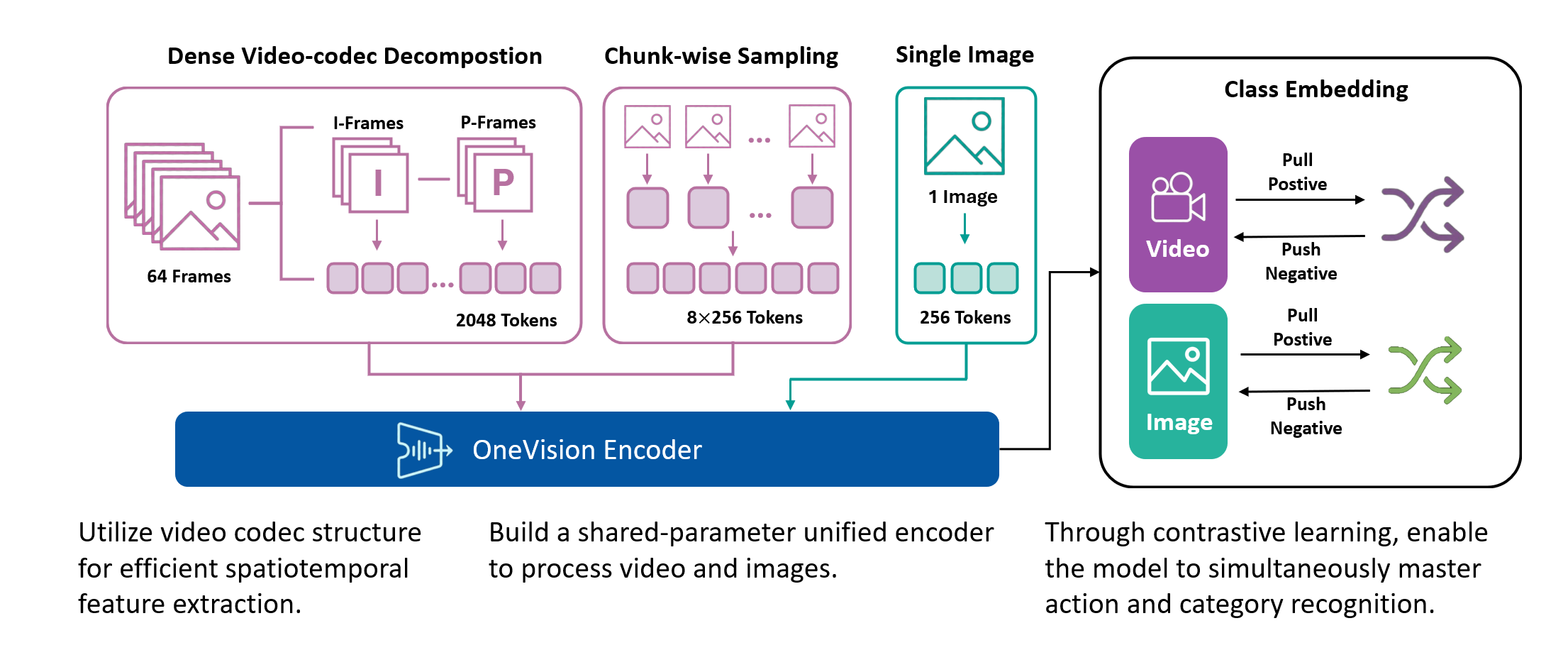
Method. OneVision-Encoder encodes video by compressing predictive visual structure into semantic meaning. By adopting Codec Patchification, OneVision-Encoder abandons uniform computation to focus exclusively on the 3.1%-25% of regions rich in signal entropy. To unify spatial and temporal reasoning under irregular token layouts, OneVision-Encoder employs a shared 3D RoPE and is trained with a large-scale cluster discrimination objective over more than one million semantic concepts, jointly capturing object permanence and motion dynamics.
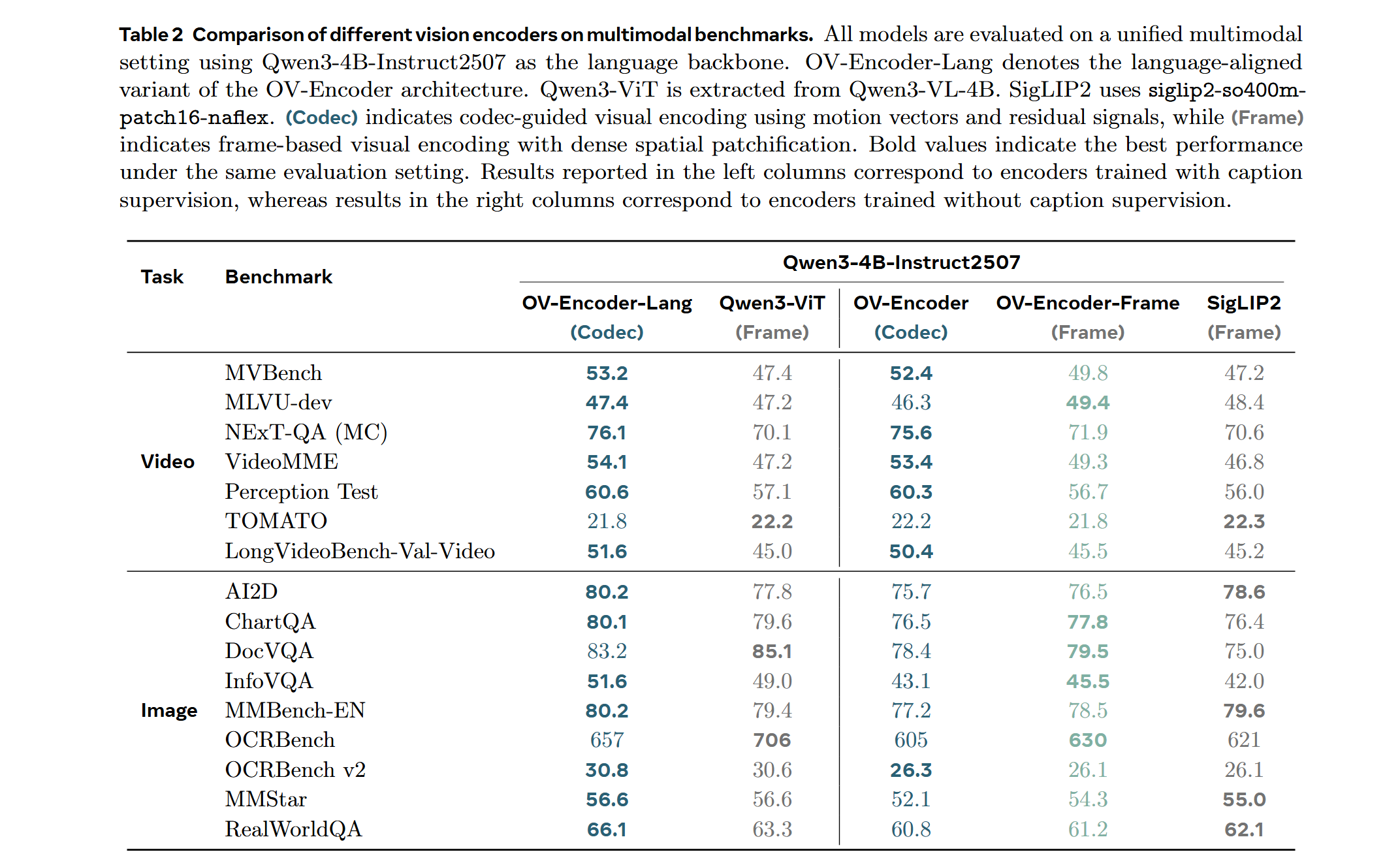
Evidence. The results validate our core hypothesis: efficiency and accuracy are not a trade-off; they are positively correlated. By resolving the dichotomy between dense grids and sparse semantics, OneVision-Encoder redefines the performance frontier. When integrated into large multimodal models, it consistently outperforms strong vision backbones such as Qwen3-ViT and SigLIP2 across 16 image, video, and document understanding benchmarks, despite using substantially fewer visual tokens and pretraining data. Notably, on video understanding tasks, OneVision-Encoder achieves an average improvement of 4.1% over Qwen3-ViT. Under attentive probing, it achieves state-of-the-art representation quality, with 17.1% and 8.1% Top-1 accuracy improvements over SigLIP2 and DINOv3, respectively, on Diving-48 under identical patch budgets. These results demonstrate that codec-aligned, patch-level sparsity is not an optimization trick, but a foundational principle for next-generation visual generalists, positioning OneVision-Encoder as a scalable engine for universal multimodal intelligence.
- Unified Vision Foundation: A single base model for consistent understanding of images, videos, and OCR.
- Codec-Style Patch Selection: Instead of sampling sparse frames densely (all patches from few frames), OneVision Encoder samples dense frames sparsely (important patches from many frames).
- 3D Rotary Position && Native Resolution: Uses a 4:6:6 split for temporal, height, and width dimensions to capture spatiotemporal relationships. Supports native resolution input without tiling or cropping.
- Global Contrastive Learning: Trained with a 2M concept bank for better-separated semantic clusters.
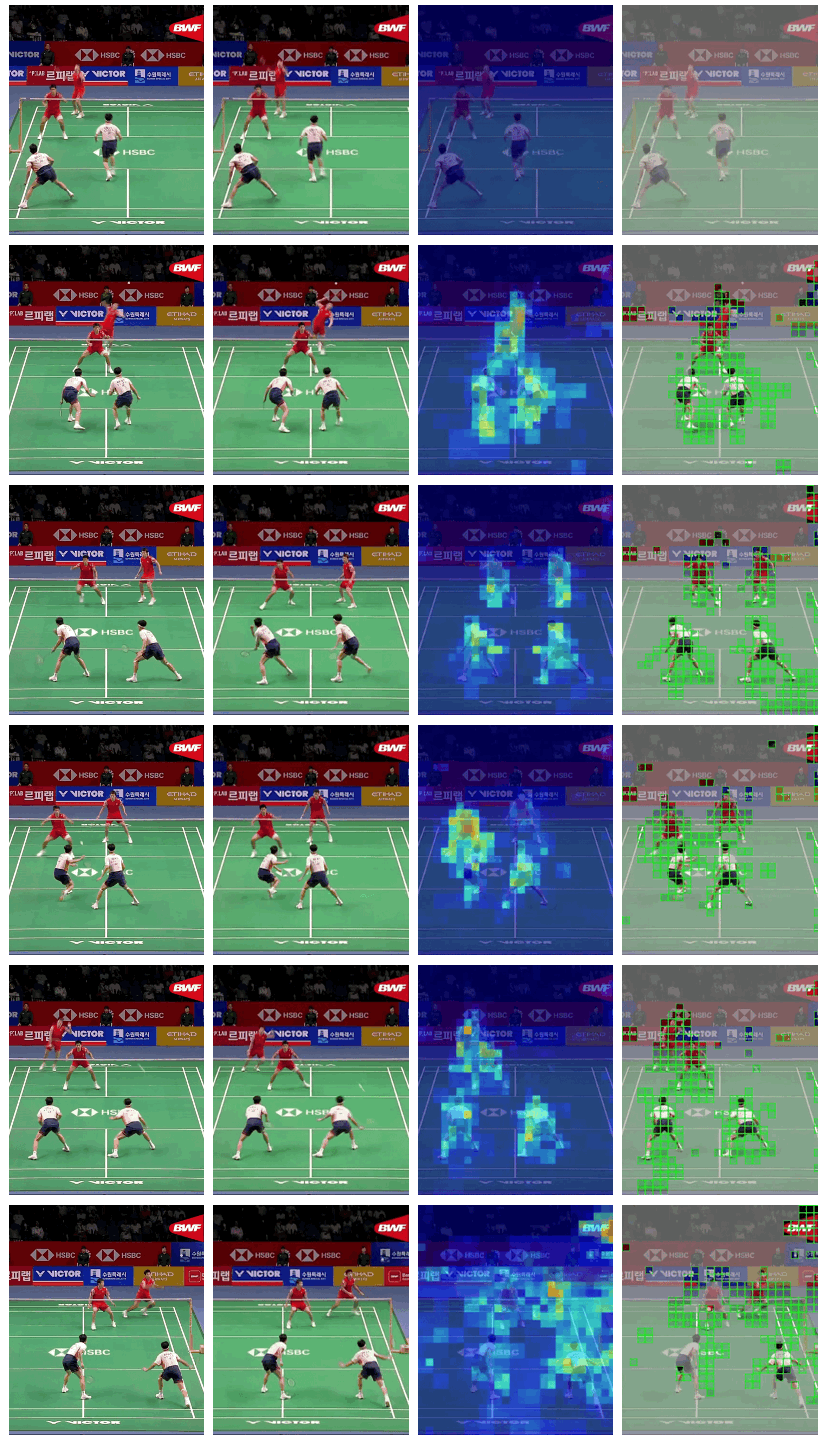
The visualization below illustrates four different video processing pipelines.
1. Original Video: a continuous 64-frame sequence that preserves the complete temporal context.
2. Uniform Frame Sampling: a conventional strategy that selects 4–8 evenly spaced frames; while simple and efficient, it is inherently lossy and fails to capture fine-grained inter-frame motion.
3. Temporal Saliency Detection: a global analysis of all 64 frames to identify regions rich in temporal information, including motion patterns, appearance variations, and semantic events.
4. Codec-Style Patch Extraction: selective extraction of the temporally salient patches in a zigzag order, achieving 75–98% compression while retaining critical temporal dynamics.
| (1) | (2) | (3) | (4) |
|---|---|---|---|
 |
|||
 |
|||
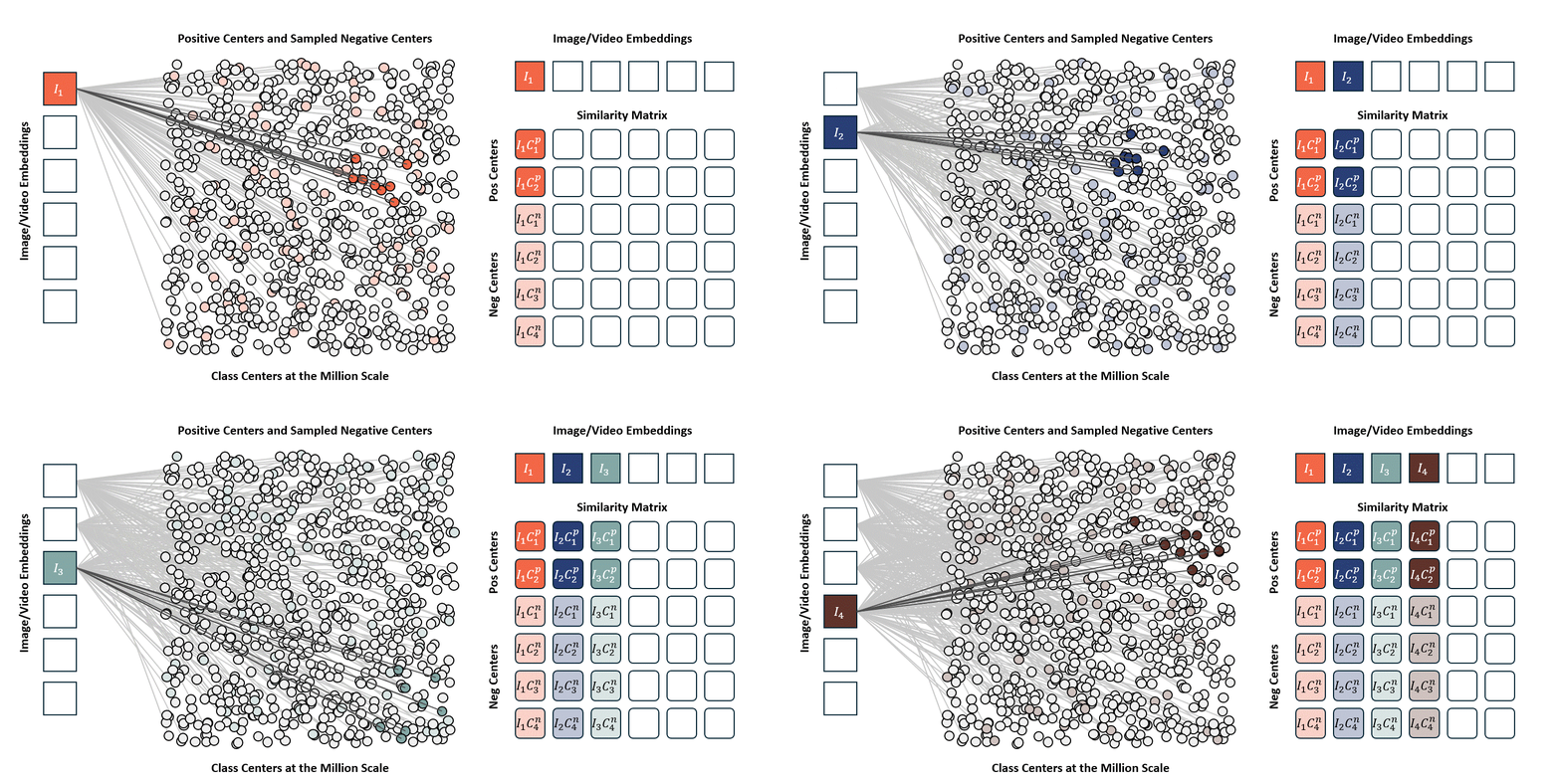
Standard contrastive learning methods (e.g., CLIP) are fundamentally constrained by batch size, as negative samples are drawn only from the current batch, typically limited to 32K–64K examples. This restriction yields a narrow and incomplete view of the embedding space, often resulting in suboptimal representation learning. In contrast, our approach maintains a global concept bank comprising 2M clustered centers, allowing each training sample to contrast against a diverse and representative set of negatives independent of batch composition. This global contrasting mechanism leads to more discriminative embeddings and well-separated semantic clusters.
We train the model on a mixed dataset comprising 740K samples from LLaVA-OneVision and 800K samples from LLaVA-Video SFT, proceeding directly to Stage-2 fine-tuning. Following a streamlined native-resolution strategy inspired by LLaVA-OneVision, input frames that match the model’s native resolution are fed directly into the network without tiling or cropping, allowing us to fully evaluate the ViT’s native-resolution modeling capability.
Note
To reproduce these results, use the llava_next folder contents.
Click to expand reproduction instructions
-
Navigate to the LLaVA-NeXT directory:
cd llava_next -
Setup the environment:
# Using Docker (recommended)
docker build -t ov_encoder_llava:26.01 .
docker run -it --gpus all --ipc host --net host --privileged \
    -v "$(pwd)":/workspace/OV-Encoder-Llava \
    -w /workspace/OV-Encoder-Llava \
    ov_encoder_llava:26.01 bash
-
Prepare training data:
- Follow the training data preparation guide to convert your video data to codec format
- The training dataset should include:
- 740K samples from LLaVA-OneVision
- 800K samples from LLaVA-Video SFT
-
Run Stage-2 fine-tuning:
# Configure the training script with your data paths bash scripts/sft_ov_encoder.sh -
Evaluate the model:
# For video benchmarks
bash scripts/precompute_codec_patch/preprocess_video_benchmark.sh videomme
TASKS="videomme" bash scripts/eval/eval_ov_encoder.sh

# For image benchmarks
TASKS="ai2d,chartqa,docvqa_val" bash scripts/eval/eval_ov_encoder.sh
For detailed documentation on training data format, evaluation setup, and troubleshooting, refer to the LLaVA-NeXT README.
Important
Transformers Version Compatibility:
- ✅
transformers==4.57.3(Recommended): Works withAutoModel.from_pretrained() ⚠️ transformers>=5.0.0: Not currently supported. We are actively working on a fix.
Note: This model supports native resolution input. For optimal performance:
- Image: 448×448 resolution (pre-trained)
- Video: 224×224 resolution with 256 tokens per frame (pre-trained)
Use CLIP preprocessing from the model repository.
Click to expand code example
from transformers import AutoModel, AutoImageProcessor
from PIL import Image
import torch

# Load model and preprocessor
model = AutoModel.from_pretrained(
    "lmms-lab-encoder/onevision-encoder-large",
    trust_remote_code=True,
    attn_implementation="flash_attention_2"
).to("cuda").eval()

preprocessor = AutoImageProcessor.from_pretrained(
    "lmms-lab-encoder/onevision-encoder-large",
    trust_remote_code=True
)

# Image inference: [B, C, H, W]
image = Image.open("path/to/your/image.jpg")  # Replace with your image path
pixel_values = preprocessor(images=image, return_tensors="pt")["pixel_values"].to("cuda")
with torch.no_grad():
    outputs = model(pixel_values)
    # outputs.last_hidden_state: [B, num_patches, hidden_size]
    # outputs.pooler_output: [B, hidden_size]

# Video inference: [B, C, T, H, W] with patch_positions
num_frames, target_frames = 16, 64
patch_size = 14
# Load video frames and preprocess each frame (replace with your video frame paths)
frames = [Image.open(f"path/to/frame_{i}.jpg") for i in range(num_frames)]
video_pixel_values = preprocessor(images=frames, return_tensors="pt")["pixel_values"]
# Reshape from [T, C, H, W] to [B, C, T, H, W]
video = video_pixel_values.unsqueeze(0).permute(0, 2, 1, 3, 4).to("cuda")

# Build patch_positions for temporal sampling: [B, num_frames * frame_tokens, 3]
frame_pos = torch.linspace(0, target_frames - 1, num_frames).long().cuda()  # [T]
grid_h, grid_w = video.shape[-2] // patch_size, video.shape[-1] // patch_size  # patch grid
frame_tokens = grid_h * grid_w

t_positions = frame_pos[:, None].repeat(1, frame_tokens).reshape(-1)  # [T * frame_tokens]
h_positions = torch.arange(grid_h, device="cuda").repeat_interleave(grid_w)
h_positions = h_positions.repeat(num_frames)  # [T * frame_tokens]
w_positions = torch.arange(grid_w, device="cuda").repeat(grid_h)
w_positions = w_positions.repeat(num_frames)  # [T * frame_tokens]

patch_positions = torch.stack([t_positions, h_positions, w_positions], dim=-1).unsqueeze(0)
# patch_positions example (256 tokens per frame, 16x16 patch grid):
#   Each row is [t, h, w].
#   First 4 patches of frame 0 (t=0):
#     patch_positions[0, 0:4, :] -> [[0, 0, 0], [0, 0, 1], [0, 0, 2], [0, 0, 3]]
#   First 4 patches of frame 1 (t=4):
#     patch_positions[0, 256:260, :] -> [[4, 0, 0], [4, 0, 1], [4, 0, 2], [4, 0, 3]]

with torch.no_grad():
outputs = model(video, patch_positions=patch_positions)Click to expand installation and usage code
git clone https://github.com/EvolvingLMMs-Lab/OneVision-Encoder.git
cd OneVision-Encoder
pip install -e .
from onevision_encoder import OneVisionEncoderModel, OneVisionEncoderConfig
from transformers import AutoImageProcessor
model = OneVisionEncoderModel.from_pretrained(
"lmms-lab-encoder/onevision-encoder-large",
trust_remote_code=True,
attn_implementation="flash_attention_2"
).to("cuda").eval()
preprocessor = AutoImageProcessor.from_pretrained(
"lmms-lab-encoder/onevision-encoder-large",
trust_remote_code=True
)Add codec-style input documentation for temporal saliency-based patch selection.
You can set up the environment using one of the following two methods:
Click to expand setup commands
conda env create -f environment.yml -n ov_encoder
pip install torch==2.7.0 torchvision==0.22.0 torchaudio==2.7.0 --index-url https://download.pytorch.org/whl/cu118
pip install --extra-index-url https://pypi.nvidia.com --upgrade nvidia-dali-cuda110
pip install -r requirements.txtClick to expand Docker commands
docker build -t onevision-encoder:2601 .

docker run -it --rm --gpus all --ipc host --net host --privileged \
    -v "$(pwd)":/workspace/OneVision-Encoder \
    -w /workspace/OneVision-Encoder \
onevision-encoder:2601 bashInside the container, install the package in editable mode:
Click to expand install command
pip install -e .Click to expand training command
bash shells/ov_encoder_base_stage1_si.shDownload the Stage-1 checkpoint from HuggingFace:
Click to expand download and training commands
git clone https://huggingface.co/lmms-lab-encoder/onevision-encoder-large-siDownload the pretraining data and prepare the data directory as per the instructions in data/README.md.
More documentation will be added soon.
bash shells/ov_encoder_large_stage2_residual_8gpus.shTraining configurations and hyperparameters will be documented soon. For now, please refer to --help for available options.
To evaluate the OneVision Encoder as a vision backbone for LLaVA-NeXT multimodal models, we use the lmms-eval framework with various vision-language benchmarks.
Navigate to the llava_next directory and follow the setup instructions:
For more details, refer to the LLaVA-NeXT documentation.
Click to expand LLaVA-NeXT evaluation setup
cd llava_next

# Using Docker (recommended)
docker build -t ov_encoder_llava:26.01 .
docker run -it --gpus all --ipc host --net host --privileged \
    -v "$(pwd)":/workspace/OV-Encoder-Llava \
    -w /workspace/OV-Encoder-Llava \
ov_encoder_llava:26.01 bashFor image benchmarks (ChartQA, DocVQA, AI2D, OCRBench, etc.):
Click to expand evaluation commands
# Evaluate on image benchmarks
TASKS="ai2d,chartqa,docvqa_val" bash scripts/eval/eval_ov_encoder.sh
For video benchmarks (VideoMME, MVBench, PerceptionTest, etc.), run each benchmark separately:
Click to expand video evaluation commands
# Preprocess video benchmark (one-time setup)
bash scripts/precompute_codec_patch/preprocess_video_benchmark.sh videomme

# Run evaluation
TASKS="videomme" bash scripts/eval/eval_ov_encoder.shTo evaluate the encoder with uniform frame sampling, first navigate to the evaluation directory:
Click to expand evaluation commands
pip install -e .
cd eval_encoder
Then run the following command:
bash shells_eval_ap/eval_ov_encoder_large_16frames.shTo evaluate the encoder with codec-style patch selection, first navigate to the evaluation directory:
Click to expand codec evaluation commands
cd eval_encoderThen run the following command:
bash shells_eval_ap/eval_ov_encoder_large_2kpatches_codec.shThe codec-inspired patch selection mechanism identifies and processes only the most informative patches from video frames, inspired by HEVC video coding.
Implementation in llava_next:
- Pipeline:
Compressed_Video_Reader/tool/- Stage 1 extracts codec info (MV/Residual energy), Stage 2 packs patches with position coordinates - Training:
llava/train/train.py- Loadspositions_thw.npypatch positions - Model:
llava/model/llava_arch.py- Passes positions to vision encoder
For detailed usage, see the LLaVA-Next README.
 anxiangsir |
 FeilongTangmonash |
 YunyaoYan |
 yiyexy |
 Luodian |
 yshenaw |
 jiankangdeng |
- nano-hevc – A minimal and educational HEVC (H.265) encoder written in Python, designed to expose the full encoding pipeline and core design principles.
- LLaVA-OneVision-1.5 – Fully open framework for democratized multimodal training, delivering state-of-the-art performance with native-resolution images at lower training costs.
- LLaVA-NeXT – Open large multimodal model for vision and language tasks, with support for images, videos, and multi-image understanding.
- UNICOM – Large-scale visual representation model trained on LAION400M and COYO700M for foundational vision tasks and multimodal applications.
- DINOv3 – Meta AI's self-supervised vision foundation model family, trained on up to 1.7B images with up to 7B parameters, producing high-quality dense visual features.
- SigLIP2 – Google's multilingual vision-language encoder with improved semantic alignment and support for dynamic image resolutions.
- lmms-eval – Unified evaluation toolkit for large multimodal models, supporting 100+ tasks across text, image, video, and audio domains.
- V-JEPA2 – Meta's self-supervised video encoder trained on internet-scale data, achieving state-of-the-art performance on motion understanding and action anticipation.


