


A Wrap for UISearchController makes all customization super easy.
Dwonload and check out the demo project.
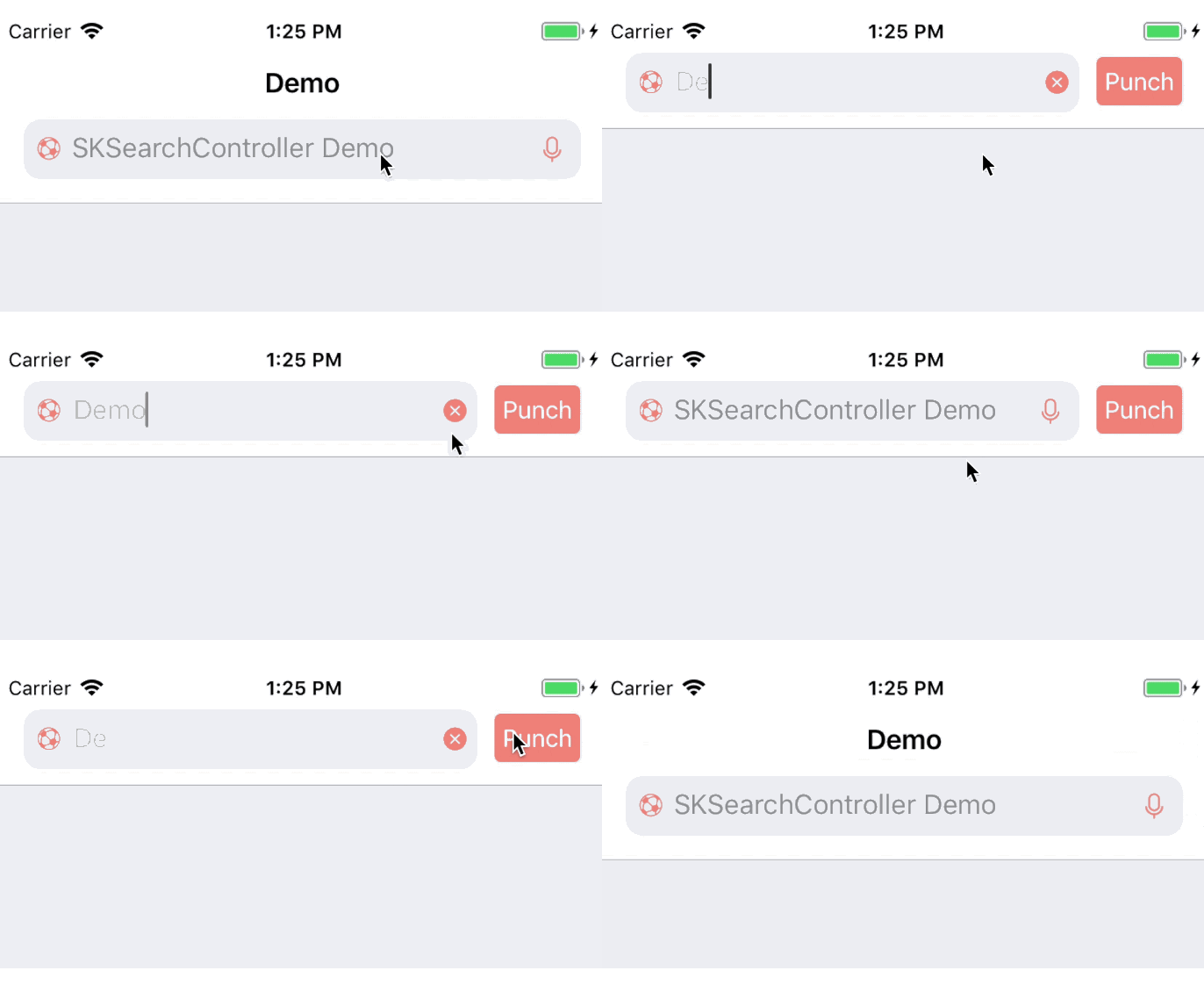
- iOS 8.0+
- Swift 4.0+
Pod `SKSearchController`
Download two .swift files in Source.
Toltally same initilizers as UISearchController
var searchController = SKSearchController(searchResultsController: nil)
All the setups must be done in the ViewDidAppear:. Some seting would be unavailable otherwise.
    func setupSearchController() {
        searchController.placeholder = "SKSearchController Demo"
        searchController.customizeCancelButton = { button in
            button.setAttributedTitle(NSAttributedString(string: "Punch", attributes: [.foregroundColor : UIColor.white, .font: UIFont.systemFont(ofSize: 15)]), for: .normal)
            button.backgroundColor = UIColor(hex: 0xEE7F79)
            button.layer.cornerRadius = 4
        }

        searchController.barBackgroundColor = UIColor(hex: 0xF9F9FA)

        searchController.leftIcon = UIImage(named: "football")
        searchController.leftIconColor =  UIColor(hex: 0xEE7F79)
        searchController.setRightBookmarkIcon(image: UIImage(named: "speaker"), color: UIColor(hex: 0xEE7F79), for: [UIControlState.normal])
        searchController.setRightClearIcon(image: UIImage(named: "x"), color: UIColor(hex: 0xEE7F79), for: [UIControlState.normal])

        searchController.cursorColor = UIColor(hex: 0x333333)
        searchController.textFieldTextColor = UIColor(hex: 0xbbbbbb)
        searchController.hideBorderLines = true
        searchController.textFieldBackgroundColor = UIColor(hex: 0xF9F9FA)

        searchController.searchTextDidChange = { searchBar, text in
            print("Keyword: \(text)")
        }
    }

    override func viewDidAppear(_ animated: Bool) {
        super.viewDidAppear(animated)
        // Do the settings here. Some settings could be unavailable otherwise.
        setupSearchController()
    }
TextField
textFieldBackgroundColor: Backgournd color oftextFieldinsearchControler's searchBartextFieldCornerRadius: corner radius of thetextFieldtextFieldTextColor: text color oftextFieldtextFieldFont: text font oftextFieldcursorColor: Set cursor color by changing the tint color of the searchFieldplaceholder: set up theplaceholderof thesearchBarattributedPlaceholder: set up theattributedPlaceholderof thetextField
CancelButton
showCancelButtonWhileEditing: determing whether shows the cancel button or not.customizeCancelButton: (UIButton)->(): a clourse help you setup the cancel buttoncencelButtonAttributedTitle: This attribute only valid whencustomizeCancelButtonblock isnilcancelButtonColor: This attribute only valid whencustomizeCancelButtonblock andcencelButtonAttributedTitleare bothnilcancelButtonTitle: This attribute only valid whencustomizeCancelButtonblock andcencelButtonAttributedTitleare bothnil
Icons
leftIcon: Set a image to the left search icon.rightClearIcon: Set a image to the clear icon showed while you are typingrightBookmarkIcon: Set a image to the bookmark icon showed on the right of the search field.
Bar
hideBorderLines: whether hide the upper and lower border line of thesearchBarbarBackgroundColor: set the search bar background, only working on iOS 11 and loweruniversalBackgoundColor: set the search bar and thenavigationBarbackground. This attribute will also setsearchBar.isTranslucenttofalseon iOS 11 and lowerhideNavitionBarBottomLine: whether hide the bottom line of thenavigationBar
func setLeftIcon(image: UIImage?, color: UIColor?, for states: [UIControlState])
Set a image to the left search icon. The icon will be redered in the color if it's not nil.
func setRightBookmarkIcon(image: UIImage?, color: UIColor?, for states: [UIControlState])
Set a image to the right bookmark icon. The icon will be redered in the color if it's not nil.
func setRightClearIcon(image: UIImage?, color: UIColor?, for states: [UIControlState])
Set a image to the right clear icon. The icon will be redered in the color if it's not nil.
The delegate methods of UISearchBar has been convert to closures like below
typealias EmptySearchBarHandler = (UISearchBar)->()
typealias BoolSearchBarHandler = (UISearchBar)->(Bool)

public var searchButtonClickHandler: EmptySearchBarHandler?
public var searchBarShouldBeginEditingHandler: BoolSearchBarHandler?
public var searchBarShouldEndEditingHandler: BoolSearchBarHandler?
public var searchBarCancelButtonClickHandler: EmptySearchBarHandler?

public var searchTextDidChange: ((UISearchBar, String)->())?
public var searchTextShouldChangeInRange: ((UISearchBar, NSRange, String)->(Bool))?
So set it up like this
searchController.searchTextDidChange =
{ searchBar, text in
        print("Content: \(text)")
}
Simple and efficient
- Objective-C version