
This MagicMirror modules, shows the processor temperature, system load and available RAM.
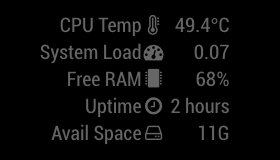
Tested with:
- Raspberry Pi
- An installation of MagicMirror2
- npm
- async
Navigate into your MagicMirror's modules folder:
cd ~/MagicMirror/modules
Clone this repository:
git clone https://github.com/BenRoe/MMM-SystemStats
Navigate to the new MMM-SystemStats folder and install the node dependencies.
cd MMM-SystemStats/ && npm install
Configure the module in your config.js file.
Navigate into the MMM-SystemStats folder with cd ~/MagicMirror/modules/MMM-SystemStats and get the latest code from Github with git pull.
If you haven't changed the modules, this should work without any problems. Type git status to see your changes, if there are any, you can reset them with git reset --hard. After that, git pull should be possible.
To use this module, add it to the modules array in the config/config.js file:
modules: [
	{
		module: 'MMM-SystemStats',
		position: 'top_center', // This can be any of the regions.
		classes: 'small dimmed', // Add your own styling. Optional.
		config: {
			updateInterval: 10000,
			animationSpeed: 0,
			align: 'right', // align labels
			//header: 'System Stats', // This is optional
			units: 'metric', // default, metric, imperial
		},
	},
]The following properties can be configured:
	<tr>
		<td><code>align</code></td>
		<td>Align the labels.
			<br><b>Possible values:</b> <code>left</code> or <code>right</code>
			<br><b>Default value:</b> <code>right</code>
		</td>
	</tr>
	<tr>
		<td><code>useSyslog</code></td>
		<td>log event to MMM-syslog?
			<br><b>Default value:</b> <code>false</code>
		</td>
	</tr>
	<tr>
		<td><code>thresholdCPUTemp</code></td>
		<td>upper-threshold for CPU Temp. If CPU Temp is more than this value, log to MMM-syslog if useSyslog=true. (celcius)
			<br><b>Default value:</b> <code>75</code>
		</td>
	</tr>
	<tr>
		<td><code>baseURLSyslog</code></td>
		<td>URL base of <a href="https://github.com/paviro/MMM-syslog">MMM-syslog module</a>
			<br><b>Default value:</b> <code>http://127.0.0.1:8080/syslog</code>
		</td>
	</tr>
</tbody>
| Option | Description |
|---|---|
updateInterval |
How often does the content needs to be fetched? (Milliseconds)
Possible values: 1000 - 86400000
Default value: 10000 (10 seconds)
|
animationSpeed |
Speed of the update animation. (Milliseconds)
Possible values: 0 - 5000
Default value: 0 (animation off)
|
language |
language id for text can be different from MM.
Default value: config.language
|
units |
What units to use.
Possible values: config.units = Specified by config.js, default = Kelvin, metric = Celsius, imperial = Fahrenheit
Default value: config.units
|
- icons
- sd-card available space
- better indication for the system load